الصفحة الرئيسية للتطبيق الخاصة
لنفترض أنك ترغب في الحصول على صفحة رئيسية خاصة للتطبيق. كل ما عليك القيام به لإنشاء صفحة أخرى في موقع الويب الخاص بك ، على سبيل المثال: الصفحة الرئيسية للتطبيق.
صمم هذه الصفحة كما تريد لعرض الجوال ثم أدخل “تحرير تفاصيل التطبيق” في لوحة معلومات التطبيق في نظامنا واستبدل الصفحة الرئيسية للتطبيق بعنوان URL للصفحة الجديدة.
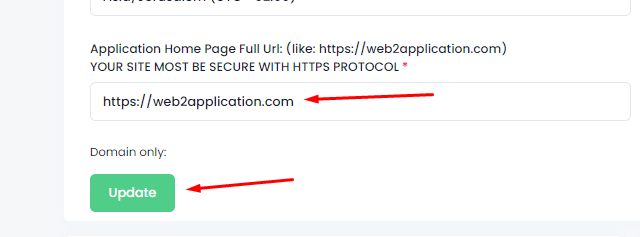 بعد التغيير ، انقر فوق حفظ وإغلاق وافتح التطبيق.
- ملاحظة: إذا كنت تستخدم شريط علامات التبويب ، فقم بتغيير عنوان URL لعلامة التبويب الأولى إلى عنوان URL الجديد للصفحة الرئيسية. عند استخدام شريط علامات التبويب ، سيفتح التطبيق علامة التبويب الأولى كصفحة رئيسية للتطبيق.
قالب خاص للتطبيق رمي موقع الويب الخاص بك
لهذا الشرح ، سنستخدم موقع WordPress ولكن يمكنك القيام بنفس الفكرة مع كل نظام أو ترميز.
أولا ، نحتاج إلى صفحات خاصة على موقع الويب لتطبيق القالب الجديد عليها باستخدام أداة إنشاء صفحات مثل elementor. تسمى مجموعات الصفحات هذه “نوع المحتوى” مثل المنشورات والمعارض وما إلى ذلك.
هناك العديد من الطرق والمكونات الإضافية لإنشاء أنواع محتوى مخصصة ويمكنك استخدام أي منها لإنشاء نوع مخصص مثل “صفحات التطبيق”.
إليك نموذج فيديو توضيحي موجود في youtube من أجلك:
هذا فيديو واحد فقط ، يمكنك العثور على المزيد على YOUTUBE
بعد أن يكون لديك نوع محتوى صفحات التطبيق، يمكنك استخدام elementor لإعداد قالب باستخدام قوالب الرأس والتذييل والنص الأساسي.
إليك فيديو شرح من Elementor:
إذا لم يكن لديك عنصر وترغب في الحصول عليه – انقر هنا
ستحتاج أيضا إلى إنشاء قائمة تطبيق تجعل المستخدم يتنقل داخل صفحات نوع المحتوى هذه.
ستجعلك مكونات 3 هذه تطبيقا سيبدو مختلفا عن موقع الويب الخاص بك بعد تحويل موقع الويب الخاص بك إلى تطبيق
How to Create Custom Home and App Pages Using Your Website Page Builder
Want a unique home page for your app? Simply create a new page on your website, for example, a “Home Page for App” designed specifically for mobile display. Then, in your Web2Application dashboard, go to “Edit App Details” and replace the home page URL with your new page’s URL. Save your changes and open your app to see the update.
Note: If you are using the bottom tab bar menu, update the first tab’s URL to your new home page URL. This ensures your app opens the correct page on launch.
Using Custom Templates with WordPress and Elementor
For WordPress users, you can create custom app pages using page builder plugins like Elementor. Create a new content type such as “App Pages” with custom templates including headers, footers, and main content areas tailored for your app.
There are many plugins available to create custom post types, allowing you to organize app-specific pages separately from your website content. This approach helps your app look and feel distinct from your website after conversion.
Watch this Elementor tutorial video to learn how to build custom templates for your app pages.
Creating a Navigation Menu for Your App
To enable smooth navigation inside your app, create a dedicated app menu that links to your custom app pages. This menu will guide users through your app content seamlessly.
By combining these three components — custom app pages, templates, and navigation menus — you can build an app that offers a unique user experience different from your website.
Ready to transform your website into a hybrid app with a native shell with custom pages? Sign up at Web2Application and start building your app today!
Frequently Asked Questions (FAQs)
- Can I use any website page builder to create app pages?
- Yes, Web2Application supports apps built from websites created with any page builder, including Elementor, Wix, Squarespace, and custom coded sites.
- How do I update my app home page after creating a new page?
- In the Web2Application dashboard, go to “Edit App Details” and update the home page URL to your new page URL, then save changes.
- Do I need to create a separate menu for app navigation?
- Yes, creating a dedicated app menu helps users navigate your app pages easily, especially if your app structure differs from your website.
- Is it necessary to use WordPress to create custom app pages?
- No, WordPress is just one example. You can create custom pages with any CMS or website builder compatible with Web2Application.
Frequently Asked Questions
Can I use any website page builder to create app pages?
Yes, Web2Application supports apps built from websites created with any page builder, including Elementor, Wix, Squarespace, and custom coded sites.
How do I update my app home page after creating a new page?
In the Web2Application dashboard, go to "Edit App Details" and update the home page URL to your new page URL, then save changes.
Do I need to create a separate menu for app navigation?
Yes, creating a dedicated app menu helps users navigate your app pages easily, especially if your app structure differs from your website.
Is it necessary to use WordPress to create custom app pages?
No, WordPress is just one example. You can create custom pages with any CMS or website builder compatible with Web2Application.
Ready to turn your site into an app?
Create your app with Web2Application — convert your website to Android and iOS apps.

 By
By