Sending push notifications is super easy and can be done from your app dashboard in our system or throw the WordPress plugin.
Basic send:
1. Go to the “send push notification” screen.
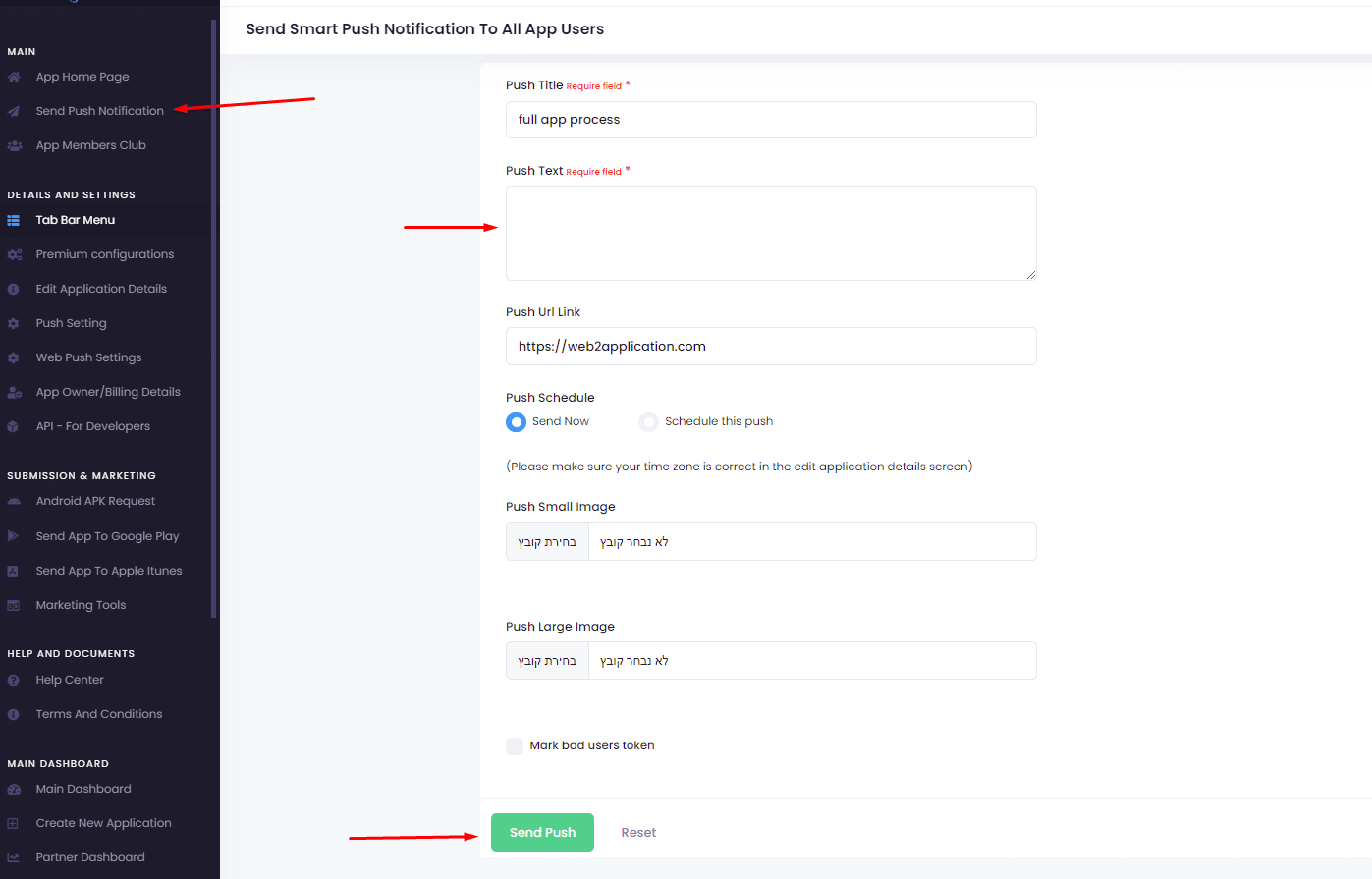
2. Write the push message you like to send.
3. Click send.
Future-dated Push Notification:
When you send push notifications you can add images and schedule a push.
If you select to schedule a push, You must make sure you set the right time zone in the “edit app details”
It’s important to understand a send push notification sent from Google Firebase. We deliver the data to Google Firebase and Firebase delivers the notifications to the devices. Sometimes it can take a while until the push arrives.
Also, some Android devices have battery savers and push blockers apps that prevent push from arriving when the app is closed. In those cases, for checking, try to open the app and put the app in the background. Then, send a test push.
How to Send Push Notifications with Web2Application
Sending push notifications with Web2Application is simple and powerful. You can send notifications directly from your app dashboard or through the WordPress plugin if your site is WordPress-based.
- Navigate to the Send Push Notification screen in your app dashboard.
- Write your push message in the input box.
- Click the Send button to deliver your notification immediately.
Scheduling and Adding Images to Push Notifications
Web2Application allows you to schedule push notifications for future delivery and include images to make your notifications more engaging. To schedule a push notification:
- Choose the Schedule Push option.
- Set the desired date and time for delivery.
- Ensure your app’s time zone is correctly set in the Edit App Details section.
Understanding Push Delivery via Google Firebase
Web2Application uses Google Firebase to send push notifications. When you send a notification, the data is sent to Firebase, which then delivers it to your users’ devices. Delivery times can vary depending on device settings and network conditions.
Note that some Android devices with battery saver modes or push blocker apps may delay or block notifications when the app is closed. To test push delivery in such cases, open the app and minimize it to the background before sending a test notification.
Why Choose Web2Application for Push Notifications?
- Easy setup and management via a user-friendly dashboard.
- Seamless integration with WordPress through our dedicated plugin.
- Support for scheduled and image-rich push notifications.
- Reliable delivery using Google Firebase infrastructure.
- Premium plans unlock advanced push notification features and store submission support.
Ready to engage your app users with timely and compelling push notifications? Sign up for Web2Application today and start sending push notifications effortlessly!
Frequently Asked Questions
How do I send a push notification using Web2Application?
Go to the Send Push Notification screen in your app dashboard, write your message, and click Send. You can also send push notifications through the WordPress plugin if your website uses WordPress.
Can I schedule push notifications for later delivery?
Yes, Web2Application allows you to schedule push notifications by selecting the schedule option and setting the desired time. Make sure your app’s time zone is correctly set in the Edit App Details section.
Why are my push notifications sometimes delayed or not received?
Push notifications are delivered via Google Firebase and can be delayed due to device battery saver modes or push blocker apps, especially on Android devices when the app is closed. Opening the app and putting it in the background can help ensure delivery.
Do I need a premium plan to use push notifications?
Basic push notifications are available, but premium plans unlock advanced features like scheduling, images in notifications, and store submission support.
How do I set up push notifications for my WordPress website?
Install the Web2Application WordPress plugin and connect it with your app using the API key from your dashboard. This syncs your content and enables push notification features.
Ready to turn your site into an app?
Create your app with Web2Application — convert your website to Android and iOS apps.

 By
By