APP SPECIAL HOME PAGE
Lets say you like to have a special home page for the app. All you need to do it to create another page in your website, for example: app home page.
design this page as you like for mobile view and then just enter your “edit application details” in your app dashboard in our system and replace the application home page with the new page URL.
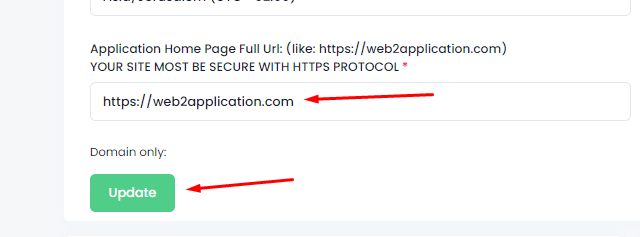 after the change, click save and close and open the app.
- NOTE: If you are using the tab bar change the first tab URL to the new home page URL. When you are using the tab bar, the app will open the first tab as the app home page.
SPECIAL TEMPLATE FOR THE APP THROW YOUR WEBSITE
For this explanation, we will use a WordPress website but you can do the same idea with every system or coding.
First, we need special pages on the website to apply the new template on them with a page builder like elementor. Those groups of pages are called “content-type” like posts, galleries and etc.
There is many ways and plugin to create custom content types and you can use any of them to create custom type like “app pages”.
Here is a sample explainer video found in youtube for you:
THIS IS ONLY ONE VIDEO, YOU CAN FIND MANY MORE ON YOUTUBE
After you have your app pages content type you can use elementor to set up a template with Header, Footer, and Body templates.
here is an explanation video from elementor:
If you don’t have elementor and you like to get it – click here
You will also need to create an app menu that will make the user navigate inside those content-type pages.
Those 3 components will make you an app that will look different form your website after your converted your website into app
Create a Special Home Page for Your App
If you want a unique home page for your app, simply create a new page on your website—such as “App Home Page”—and design it optimized for mobile view using your site’s page builder.
Then, in your Web2Application dashboard, go to Edit Application Details and replace the app’s home page URL with your new page URL. Save your changes, close the editor, and reopen your app to see the update.
Note: If you use the bottom tab bar menu, make sure to update the first tab’s URL to your new home page URL, as the app opens the first tab as the home page.
Use Special Templates for App Pages with Your Website Builder
For WordPress users, you can create custom content types (like “app pages”) using plugins or custom code. This allows you to design a set of pages specifically for your app.
With a page builder like Elementor, you can create templates including header, footer, and body sections to apply across these app pages for a consistent app look and feel.
To enable smooth navigation, build an app menu that links your custom app pages, ensuring users can easily browse inside the app.
Watch helpful tutorials on YouTube to learn how to create custom post types and Elementor templates:
Why Choose Web2Application?
Web2Application makes it easy to convert your website—complete with your custom home page and app pages—into hybrid Android and iOS apps with a native shell. Our platform supports seamless integration with WordPress and page builders like Elementor, so your app looks professional and performs smoothly.
Frequently Asked Questions
Can I use any page builder to create app pages?
Yes, you can use any page builder or CMS that allows you to create and customize pages. Web2Application supports apps built from any website, including those created with Elementor, Divi, Wix, and others.
How do I set a custom home page in my app?
Create the desired home page on your website, then update the home page URL in the Web2Application dashboard under Edit Application Details. If using the tab bar menu, update the first tab’s URL accordingly.
Can I create app-specific navigation menus?
Yes, by creating custom content types and pages, you can build app-specific menus to help users navigate within your app seamlessly.
Get Started Today
Ready to create a professional app with your custom home page and app pages? Sign up for Web2Application and start building your native Android and iOS apps with ease.
Frequently Asked Questions
Can I use any page builder to create app pages?
Yes, you can use any page builder or CMS that allows you to create and customize pages. Web2Application supports apps built from any website, including those created with Elementor, Divi, Wix, and others.
How do I set a custom home page in my app?
Create the desired home page on your website, then update the home page URL in the Web2Application dashboard under Edit Application Details. If using the tab bar menu, update the first tab’s URL accordingly.
Can I create app-specific navigation menus?
Yes, by creating custom content types and pages, you can build app-specific menus to help users navigate within your app seamlessly.
Ready to turn your site into an app?
Create your app with Web2Application — convert your website to Android and iOS apps.

 By
By