From time to time, your iOS app needs to be updated at Apple console for various reasons for patches, security, Apple’s requirements, or even for icon replacement.
Updating the app process at Apple is not complicated, but needs to pay attention to the questions that Apple is asking about the app and make sure all details are complete.
Enter your Apple account :
https://appstoreconnect.apple.com
Go to my apps and select the app that you want to update.
At the left, you will have an option to create a new version, press on the + sign
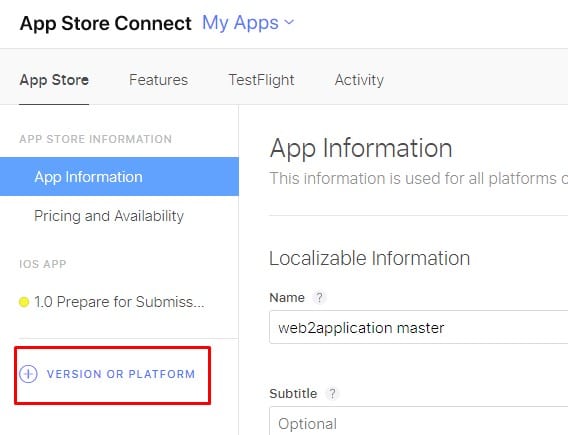
enter the version that you want to update and scroll down to the Build section and click the + sign

now select the latest build (sometimes its takes some time for Apple to process the build so if you don’t see the new build please wait until Apple will send you an email that the process is finished.)
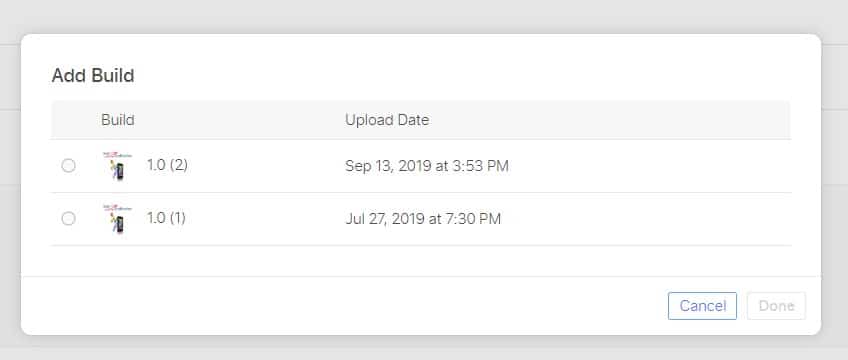
IF YOU ALREADY HAVE A BUILD, you need to remove the old build by pressing the – sign near the build
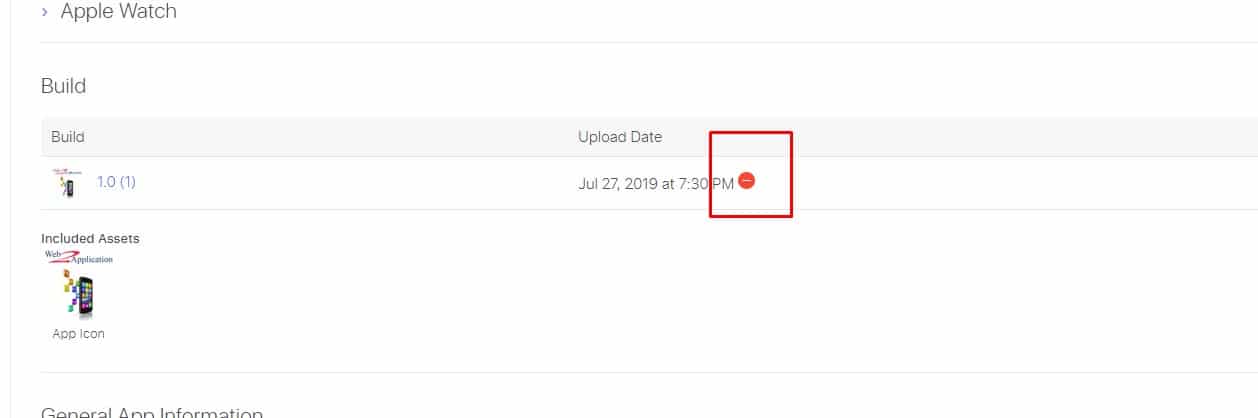
In the end, please check that all your details are filled and correct and press the Submit for Review button.
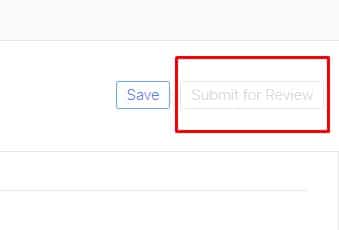
Please note that if your Button is grey then you need to check all the fields and see what missing.
Turn Your Website Into an App — Start Free
Create your app free, generate an Android test APK, and explore eligible Premium features for 14 days.
Create Your App Free · Explore Features · See How It Works · View Pricing · Follow the Free Course
Step-by-Step Guide to Update a New Build Version and Submit to Apple Review
From time to time, your iOS app needs updates for bug fixes, security patches, or design changes like icon replacement. Using Web2Application, you can easily generate a new build version and submit it to Apple for review.
- Log in to your Apple Developer account at App Store Connect.
- Navigate to My Apps and select the app you want to update.
- On the left sidebar, click the + sign next to App Versions to create a new version. Enter the new version number.
- Scroll down to the Build section and click the + sign to select the latest build uploaded via Web2Application.
- If a previous build exists, remove it by clicking the – sign next to it.
- Ensure all required app details and metadata are complete and accurate.
- Click Submit for Review to send your updated build to Apple.
Note: If the submit button is greyed out, review all fields carefully to find and complete any missing information.
With Web2Application, updating your iOS app build is streamlined and straightforward, helping you comply with Apple’s guidelines and keep your app current.

Why Choose Web2Application for Your iOS App Updates?
- Convert your website into a hybrid iOS app with a native shell with ease.
- Generate new builds quickly for testing and submission.
- Access a 14-day Premium trial to unlock advanced features including push notifications and store submission support.
- Manage app versions and updates from a user-friendly dashboard.
Create Your App Free today, generate your test APK, and explore Premium features with a 14-day trial.
Frequently Asked Questions
How do I update a new build version of my iOS app for Apple review?
Log in to App Store Connect, select your app, create a new version, add the latest build uploaded via Web2Application, ensure all app details are complete, and click Submit for Review.
What should I do if the Submit for Review button is greyed out?
Check all required fields and metadata in App Store Connect to ensure no information is missing or incomplete.
How long does Apple take to process a new build?
Processing times vary, but Apple usually sends an email notification when the build is ready to be selected for submission.
Can I test my app build before submitting to Apple?
Yes, Web2Application allows you to generate a test APK for Android and test your iOS app via TestFlight before submission.
Does Web2Application help with Apple store submission?
Premium Web2Application users can request Apple submission support directly from the dashboard to assist with the review process.
Ready to turn your website into an app?
Create your Android and iOS app without coding. Start free, generate a test APK, and explore Premium features with a 14-day trial.

 By
By