The splash screen is the screen that the user sees until the app loads.
To get the advantage of this loading time you can change the splash screen from your app dashboard and next time the user will open the app, the new splash screen will be updated from the server and shown to the user.
Please enter the “edit application details” screen:
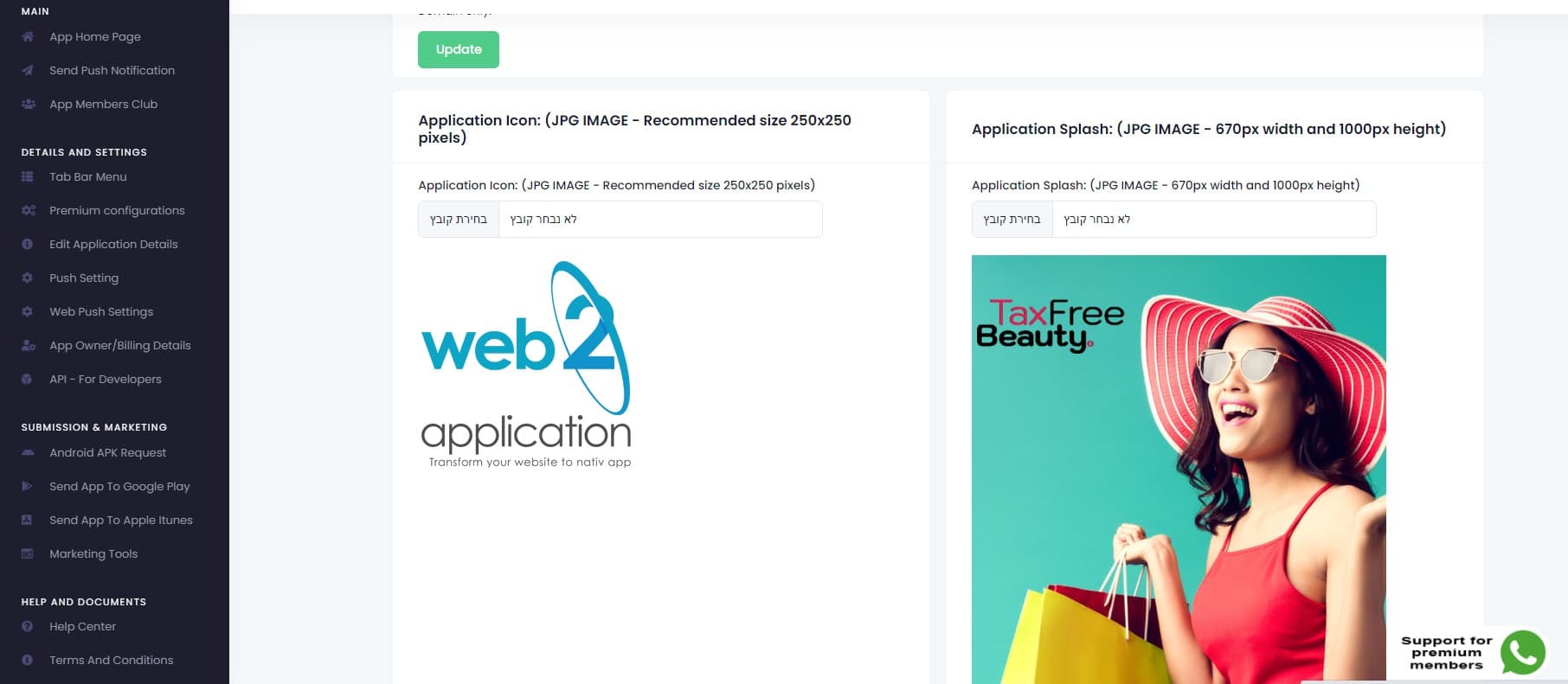
On this screen, you will see the app details on the top. at the bottom, you will see your app icon and app splash.
Changing the icon:
The app icon is inside the app code. If you change the icon you should ask for new submissions for the stores and the apps need to be approved by Google and Apple.
It’s better to make sure the icon is right before submitting it to the stores.
Recommended image: JPG lightweight size: 250×250 pixels
changing the splash:
The splash screen can be changed by clicking the upload image button on the top of the splash image.
After you upload the new image you will be able to crop it to the right size. It’s very important to understand that on Android there are a lot of screen sizes and the splash will be trip to the height of the device responsively, which means that the edges on the right and left can be cut!
To avoid cutting important staff please leave padding to the right and the left of the splash image
Recommended image: JPG lightweight size: 670×1000 pixel
How to Change Your App Splash Screen and Icon with Web2Application
The splash screen is the first visual your users see while your app loads. Using Web2Application, you can quickly update your splash screen and app icon directly from your app dashboard, ensuring your app looks professional and engaging.
Changing the App Icon
The app icon is embedded in the app code. When you update the icon, you will need to submit a new version of your app to Google Play and Apple App Store for approval. Make sure your icon meets store guidelines before submitting.
- Recommended image format: JPG
- Recommended size: 250×250 pixels
- Tip: Use a lightweight image to keep app size small
Changing the Splash Screen
To update the splash screen, click the upload button above the current splash image in your dashboard. After uploading, you can crop the image to fit.
Important: Android devices have varying screen sizes. The splash screen height will adjust responsively, but the edges on the right and left may be cropped. To avoid cutting off important content, leave padding on the sides of your splash image.
- Recommended image format: JPG
- Recommended size: 670×1000 pixels
Using Web2Application makes customizing your app simple and efficient, helping you create a polished user experience.
Frequently Asked Questions
- Do I need to resubmit my app after changing the splash screen?
- No, changing the splash screen updates immediately for users without needing a resubmission. However, changing the app icon requires submitting a new app version.
- What image formats are supported for splash screen and icon?
- JPG format is recommended for both splash screen and app icon for optimal performance and compatibility.
- Can I preview the splash screen on different devices?
- Yes, Web2Application allows you to test your app using the APK file on Android devices to see how the splash screen appears.
- What if my splash screen edges get cut off?
- Ensure you add padding on the left and right sides of your splash image to prevent important parts from being cropped on different screen sizes.
Ready to customize your app’s look? Sign up for Web2Application today and start building your native Android and iOS apps with ease.
Frequently Asked Questions
Do I need to resubmit my app after changing the splash screen?
No, changing the splash screen updates immediately for users without needing a resubmission. However, changing the app icon requires submitting a new app version.
What image formats are supported for splash screen and icon?
JPG format is recommended for both splash screen and app icon for optimal performance and compatibility.
Can I preview the splash screen on different devices?
Yes, Web2Application allows you to test your app using the APK file on Android devices to see how the splash screen appears.
What if my splash screen edges get cut off?
Ensure you add padding on the left and right sides of your splash image to prevent important parts from being cropped on different screen sizes.
Ready to turn your site into an app?
Create your app with Web2Application — convert your website to Android and iOS apps.

 By
By