Share FireBase account with users
- nir
- July 23, 2023
- Android, Apple IOS, general support
- 0 Comments
- Enter https://console.firebase.google.com and open an account (with your Gmail account).
- Click “Add project”.
- Enter the project name (App Name).
4. Now, enter Users and permissions.
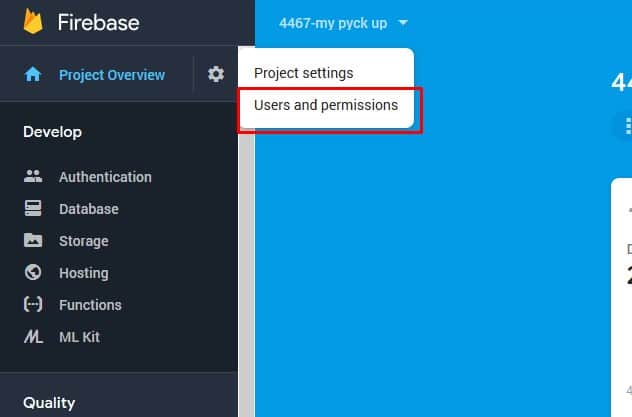
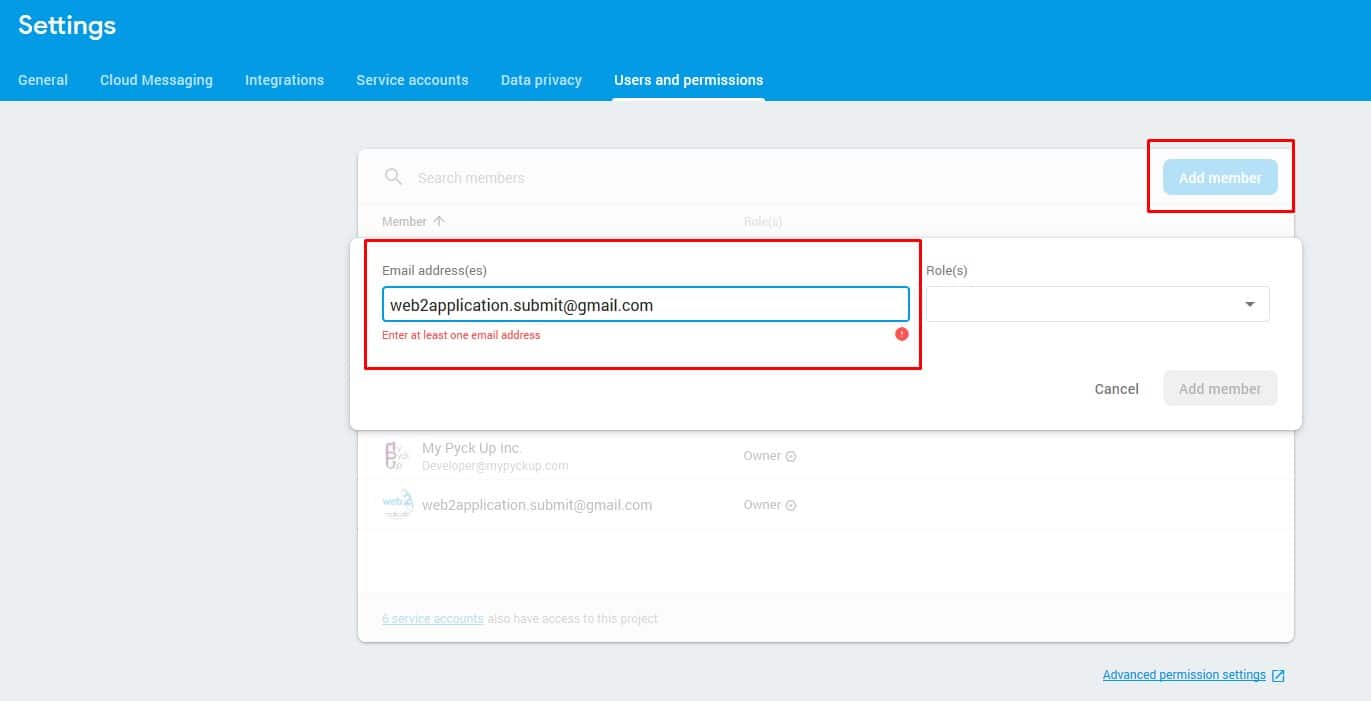
5. Click add member and enter our submit team mail: [email protected].
The role needs to be Owner.
How to Share Your Firebase Account with Users
To enable push notifications and streamline app submission with Web2Application, you need to share your Firebase project access with the Web2Application submit team and any other collaborators.
- Go to Firebase Console and sign in with your Gmail account.
- Click Add project and enter your app’s project name.
- Once your project is created, navigate to Users and permissions in the project settings.
- Click Add member and enter the email
[email protected]. - Assign the role of Owner to this member to allow full access for app submission support.
- Save the changes. Your Firebase project is now shared securely with the Web2Application team.
Sharing your Firebase account this way ensures smooth integration with Web2Application’s push notification services and helps our team assist you with app store submissions.
Why Share Firebase Access with Web2Application?
- Push Notifications: Enable Web2Application to configure and send push notifications through Firebase.
- App Submission Support: Our team can help submit your app to Google Play and Apple App Store efficiently.
- Security: Assigning the correct role ensures controlled and secure access without compromising your project.
Related Resources
- How to Enable Push Notifications with Firebase on Web2Application
- Google Play Store Submission Guide
- Apple App Store Submission Guide
Frequently Asked Questions (FAQ)
Can I share my Firebase account with multiple users?
Yes, Firebase allows you to add multiple users with different roles such as Owner, Editor, or Viewer depending on the level of access you want to grant.
Is it safe to give Web2Application Owner access to my Firebase project?
Yes, Web2Application requires Owner access to properly configure push notifications and assist with app submissions. The team follows strict security protocols to protect your data.
What happens if I don’t share my Firebase account with Web2Application?
Without sharing Firebase access, you won’t be able to use push notifications in your app, and Web2Application cannot assist with app store submissions that require Firebase configuration.
Ready to build your app with Web2Application? Sign up now and start converting your website into a hybrid Android and iOS app with a native shell today!
Frequently Asked Questions
Can I share my Firebase account with multiple users?
Yes, Firebase allows you to add multiple users with different roles such as Owner, Editor, or Viewer depending on the level of access you want to grant.
Is it safe to give Web2Application Owner access to my Firebase project?
Yes, Web2Application requires Owner access to properly configure push notifications and assist with app submissions. The team follows strict security protocols to protect your data.
What happens if I don’t share my Firebase account with Web2Application?
Without sharing Firebase access, you won’t be able to use push notifications in your app, and Web2Application cannot assist with app store submissions that require Firebase configuration.
Ready to turn your site into an app?
Create your app with Web2Application — convert your website to Android and iOS apps.