Premium Configurations Features
- nir
- July 23, 2023
- web to applicataion features
- 0 Comments
Your new apps created by web2application have a lot of features and options in order to customize your apps in the best way for your business. In this article, we will review and review some of the options at the premium configurations features screen.
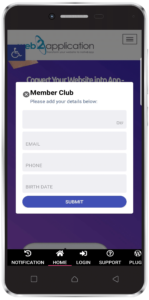
Members club is a powerful tool for each business. It’s true that each user that downloads the app becomes a member of yours but sometimes you like to get more information about the user like email, phone, and birthday in order to send gifts and special offers.
This feature will help you request information from the user. The form fields can be translated to any language from your app dashboard.
After the user fills in his details he will not see this form anymore and he will see a small cog that will allow him to edit and delete his data.
All lists will be saved in your app dashboard and you will be able to export the list to Excel.
Some apps want landscape more and some do not support it. From your app dashboard, you will be able to control if the apps will allow landscape mode or not.
Some apps want to allow zoom inside the app and some apps want to prevent these options for many reasons. From your app dashboard, you will be able to control if the apps will allow zoom or not.
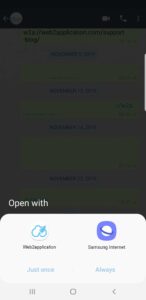
Most of the time apps need access to the files and camera in order for the app features to work like a social network or even a simple form with an option to attach images or documents.
You have the option to select if you like the app to support camera and files or not from your app dashboard.
If you convert a website that uses GeoLocation then you need special permissions in the app.
With web2application system, you can select if you like to operate GeoLocations permissions in your app or not from your app dashboard.
When you convert a website to an iOS app there is a problem because iPhones do not have a back button like an android device.
With this iOS back button feature, you will be able to add a back button to your app throw your app dashboard.

On iPhone devices, there is the phone status bar with the battery and etc.
With this option, you can change the color of the status bar to match your app.
When a user login your app, the app will remember his login (unless he has some special setting in his phone or application to prevent it).
The next time the user will open the app, he will be logged in automatically.
Where do you like to open external links? Is the link is blank and needs to be open in the browser?
With this option, you will be able to select if you like to open external links inside the app or in the phone browser.
Apps cache will make your apps work faster by saving a version of the app pages that the user visit on his device.
Also if the user visits the page in the past and he has some internet problem the page will load from the phone cache.
Refresh the app, if the user is inside the app and he wants to refresh the page he can pull the screen down to refresh.
You can select if you want to disable it from the app dashboard.
Explore Premium Configurations Features with Web2Application
Web2Application offers a comprehensive set of premium configurations features designed to help you tailor your app to your business needs. Below are key options you can control directly from your app dashboard:
- Signup Form: Collect valuable user information such as email, phone number, and birthday to engage with your members through gifts and special offers. The form supports multiple languages and allows users to edit or delete their data. Export your user lists easily to Excel.
- Landscape Mode: Choose whether your app supports landscape orientation to optimize user experience based on your app type.
- Zoom Control: Enable or disable zoom functionality inside your app to suit your content presentation.
- Deep Link Support for Camera and Files: Allow your app to access device camera and files, essential for apps with social features or forms that require image/document attachments.
- Geo Location Permissions: Manage geolocation access permissions for apps that rely on location services.
- iOS Back Button: Add a back button to your iOS app to improve navigation since iPhones lack a physical back button.
- iOS Custom Status Bar: Customize the color of the iPhone status bar to match your app’s branding.
- Login Remember: Enable automatic login for returning users, enhancing user convenience.
- External Links Opening: Decide whether external links open inside the app or in the device’s browser for better user control.
- App Cache: Improve app speed and performance by managing cache settings effectively.
These premium configurations features empower you to create a seamless, branded, and user-friendly app experience. Web2Application makes it easy to manage all these settings from your dashboard without coding.
Create Your App Free today to generate a test APK and explore all premium features with a 14-day trial.
Learn more about Web2Application features and support to get the most out of your app.
Frequently Asked Questions
What are premium configurations features in Web2Application?
Premium configurations features are advanced settings available in your Web2Application dashboard that allow you to customize app behavior such as landscape mode, zoom, deep linking, geolocation permissions, and more to optimize your app for your business needs.
Can I collect user information with Web2Application apps?
Yes, the Signup Form feature lets you request user details like email, phone, and birthday. This information is stored in your dashboard and can be exported for marketing and engagement purposes.
How do I enable push notifications and other premium features?
Push notifications and other premium features are unlocked with a Premium plan. You can try these features free for 14 days when you create your app with Web2Application.
Is it possible to customize the iOS app status bar color?
Yes, Web2Application allows you to change the iOS status bar color from your app dashboard to match your app’s branding.
How do I test my app before submitting to app stores?
You can generate a test APK file directly from your Web2Application dashboard to install on Android devices and test your app before submission.
Ready to turn your website into an app?
Create your Android and iOS app without coding. Start free, generate a test APK, and explore Premium features with a 14-day trial.