Partilhar o acesso à conta de programador do Google Play
- nir
- July 23, 2023
- Uncategorized
- 0 Comments
Depois de ter uma conta de programador no Google, é provável que queira carregar algumas aplicações. 🙂
Se não carregar a aplicação por si próprio, a melhor forma de permitir que o seu programador carregue a aplicação na sua conta é partilhando o acesso com ele e dando-lhe permissão.
O processo é muito simples:
Entre na consola do Google Play, clique em definições e depois em utilizadores e permissões.
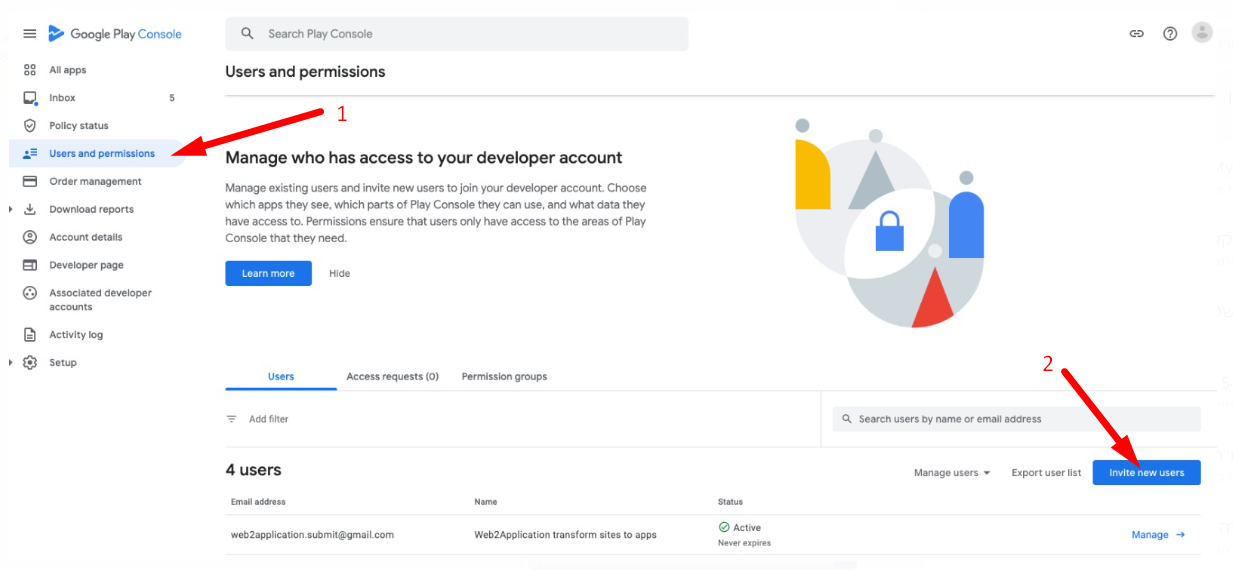
Agora prima CONVIDAR NOVO UTILIZADOR.
Abre-se uma janela de atribuição de utilizadores.
Na mensagem de correio eletrónico, introduzir: [email protected]
Também pode definir um período de tempo a partir da partilha da conta, definindo a data de expiração, se não quiser deixar o acesso durante muito tempo (opcional)
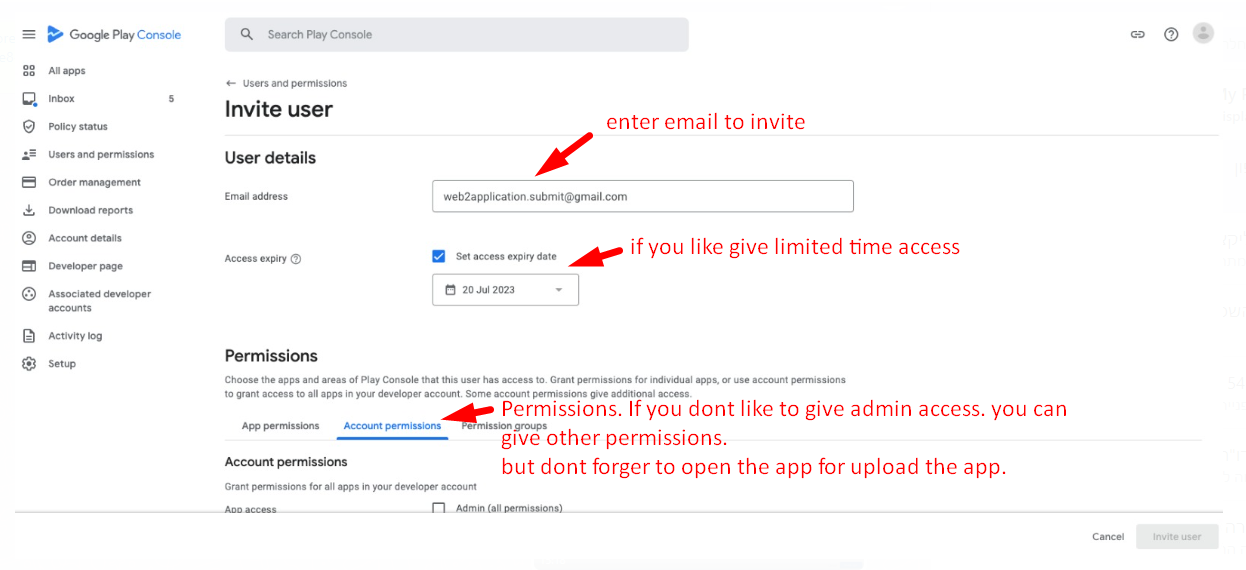
Permissões:
pode dar autorização a ADMIN se quiser que abramos a aplicação e a carreguemos para a sua conta.
se não quiser dar permissões de administrador, pode dar outras permissões, mas certifique-se de que abre uma aplicação para carregar a aplicação.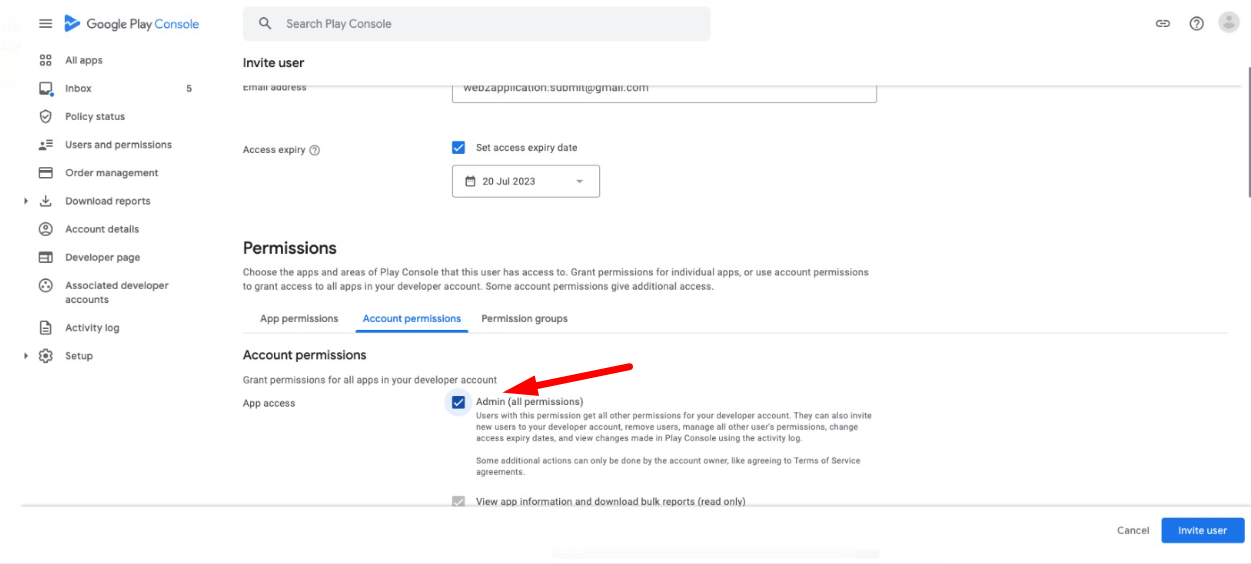
Depois de partilhar o acesso, informe a equipa de apoio premium por Whatsapp. 🙂
How to Share Access to Your Google Play Developer Account
Managing your Google Play Developer account securely is essential when collaborating with developers or agencies like Web2Application. Sharing access allows your trusted developer to upload and manage your apps without compromising your account security.
- Log in to the Google Play Console: Access your developer account at https://play.google.com/console.
- Navigate to Users and Permissions: Click on the Settings icon in the left menu, then select Users and Permissions.
- Invite a New User: Click Invite New User to open the invitation form.
- Enter Email Address: Use
[email protected]to invite the Web2Application team for app submission support. - Set Permissions: You can assign Admin permissions if you want Web2Application to fully manage app uploads, or customize permissions to limit access as needed.
- Optional Expiration Date: For added security, set an expiration date for the access to automatically revoke permissions after a certain period.
- Send Invitation: Click Send to share the access.
- Notify Web2Application Support: After sharing access, inform the Web2Application premium support team via WhatsApp for smooth app submission assistance.
By following these steps, you ensure a secure and efficient collaboration with Web2Application, enabling seamless app publishing on Google Play.
Why Choose Web2Application for Your App Submission?
Web2Application specializes in converting your website into hybrid Android and iOS apps with a native shell and offers expert support for store submissions. Sharing your Google Play Developer account access securely allows our team to handle the technical process and help your app reach users faster.
Explore more about submitting Android apps to Google Play and premium support options on our website.
Frequently Asked Questions (FAQ)
Can I share access to my Google Play Developer account without giving full admin rights?
Yes, Google Play Console allows you to customize user permissions. You can grant limited access so your developer can upload apps without full administrative control.
Is it safe to share my Google Play Developer account access?
Sharing access using Google’s user invitation system is secure. You control permissions and can revoke access anytime. Setting an expiration date adds extra security.
How do I revoke access once the developer no longer needs it?
You can revoke user access anytime from the Users and Permissions section in your Google Play Console by removing the user or changing their permissions.
Can Web2Application help me submit my app to Google Play?
Absolutely! Web2Application offers premium support to help you submit your app to Google Play, including managing your developer account access and handling the submission process.
Ready to convert your website into a professional app? Sign up with Web2Application today and start building your native Android and iOS apps with ease.
Frequently Asked Questions
Can I share access to my Google Play Developer account without giving full admin rights?
Yes, Google Play Console allows you to customize user permissions. You can grant limited access so your developer can upload apps without full administrative control.
Is it safe to share my Google Play Developer account access?
Sharing access using Google's user invitation system is secure. You control permissions and can revoke access anytime. Setting an expiration date adds extra security.
How do I revoke access once the developer no longer needs it?
You can revoke user access anytime from the Users and Permissions section in your Google Play Console by removing the user or changing their permissions.
Can Web2Application help me submit my app to Google Play?
Absolutely! Web2Application offers premium support to help you submit your app to Google Play, including managing your developer account access and handling the submission process.
Ready to turn your site into an app?
Create your app with Web2Application — convert your website to Android and iOS apps.